¶ Creating your first SE Mod
Preface: This page is a work in progress!
This tutorial will walk you through creating a simple mod with Norbyte’s Script Extender(SE) that stops your companions from going back to their tent while in camp. Aditionally we will utilize SE together with stats to make this behaviour toggleable.
This tutorial is based on Satan & Alithea Ancunín’s implementation of Stay still in camp and play idle animations anywhere. Please note that the final mod also adds idle animations, which isn’t part of this tutorial.
If you have not used SE before, it’s recommended to read Getting started with Script Extender first.
¶ 1. Outlining your strategy
First, you are going to be organizing the functions and game elements you will be needing for your mod. One of the best resources for this can be found on Laughing Leader’s Github, which contains a list of Osiris (native) functions you can use.
To find the flags, spells, passives or any other game elements you might need, you can use Norbsearch, or index your game files using ShinyHobo’s Multitool.
¶ 2. Preparing your workspace
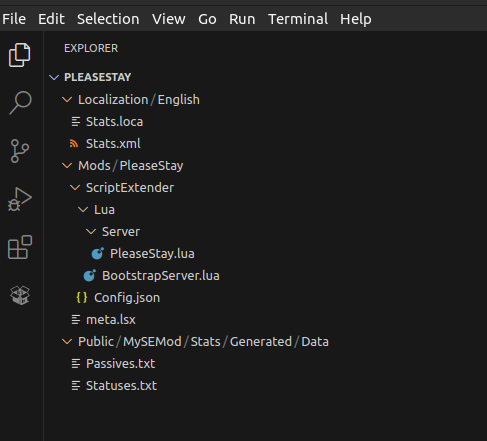
Once you’ve outlined the necessary functions, flags, spells, items, and other elements, you need to prepare your workspace. It’s important to create a proper file structure:
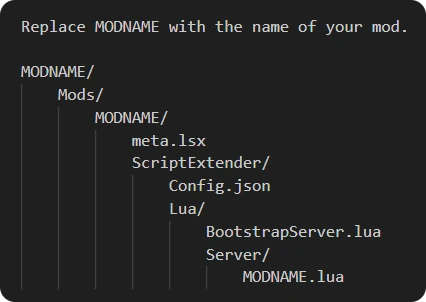
Upon organizing your folder structure, you can go ahead and pack the mod, which - if you’re using BG3 Multitool - will prompt you to add an author (That’s your name!), a description for your mod and a version.
You are now ready to begin coding your mod!
An example workspace to adjust accordingly can be viewed and downloaded from google drive.
¶ 3. Writing the code
¶ 3.1 Defining your Constants
First, we will define our constants. These are variables that will be used throughout our code. They are usually used for flags, UUIDs, or any important value you would like to use in more than one function/event.
In the following example, we are defining two constants, FLAG_IN_CAMP, which is defined as the UUID of an immobile character, and ModAuthor, which is defined as a simple string with the value “Smart”.
-- variables

FLAG_IN_CAMP = "161b7223-039d-4ebe-986f-1dcd9a66733f"
ModAuthor = "Smart"
¶ 3.2 Writing your Methods
We will now use our previously defined variables in functions (methods) of our design. In the following example, we are creating two functions, stopMoving and startMoving:
-- methods

---@param character GUIDSTRING     - the character who will stop moving in camp
function stopMoving(character)
    if Osi.GetFlag(FLAG_IN_CAMP, character) == 1 then
        Osi.ClearFlag(FLAG_IN_CAMP, character)
    end
end
---@param character GUIDSTRING     - the character who will start moving again in camp
function startMoving(character)
    if Osi.GetFlag(FLAG_IN_CAMP, character) == 0 then
        Osi.SetFlag(FLAG_IN_CAMP, character)
    end
end
¶ 3.3 Making your Code Event-driven
Mods are often, if not always, driven by Game Events, moments in the game that trigger an “event”, which we will “listen” to and apply our functions afterwards.
For example, if we wanted to apply the stopMoving function after a character enters combat, this is how it would look like:
        Ext.Osiris.RegisterListener("EnteredCombat", 2, "after", function(character, combatid)
            stopMoving(character)
    end)
You can find more events at https://github.com/LaughingLeader/BG3ModdingTools/blob/master/generated/Osi.Events.lua
¶ 4. Interdiscipline: Using stats file in conjunction with SE
You can call game statuses, passives or other elements inside your SE functions and events. You can also create your own statuses and passives. Here are examples of a status and a passive.
¶ 4.1 Status
new entry "STAY_STILL_STATUS"
type "StatusData"
data "StatusType" "BOOST"
data "DisplayName" "h38fc0213b20a4412bf0f223aeda5a7e974a9"
data "Description" "hd5dfdb8b7aa34a808f628362b0f04fa8884a"
data "Icon" "Spell_Conjuration_DimensionDoor"
data "StackId" "STAY_STILL_STATUS"
¶ 4.2 Passive
new entry "STAY_STILL_PASSIVE"
type "PassiveData"
data "DisplayName" "h03652d052f114f8ebbc10bc2602cddc835e7"
data "Description" "h31d5cb6c31ed4d198231d44624caf7c59f5b"
data "Icon" "Spell_Conjuration_DimensionDoor"
data "Properties" "IsToggled;ToggledDefaultAddToHotbar"
data "ToggleOnFunctors" "ApplyStatus(STAY_STILL_STATUS,100,-1)"
data "ToggleOffFunctors" "RemoveStatus(STAY_STILL_STATUS)"
In order to display tooltips and/or descriptions in-game, you will need to create a Localization file with the extension .loca.xml. It is highly recommended to use the BG3 Mod Helper VSCode extension for this purpose, as it allows you generate handles inside your stats file and automatically creates localizations for you.
Below is an example of a Localization file. As you can see, the contentuids correspond to the descriptions and display names of the Status and Passive above.
¶ 4.3 Localization File
<?xml version="1.0" encoding="utf-8"?>
<contentList>

    <!-- Toggle for entity to stay still in camp -->

    <content contentuid="h03652d052f114f8ebbc10bc2602cddc835e7" version="1">Stay still in Camp</content>
    <content contentuid="h31d5cb6c31ed4d198231d44624caf7c59f5b" version="1">When this is active, the companion will not move back to their tent while in camp</content>

    <!-- Passive Applied to entity when it is standing still -->

    <content contentuid="h38fc0213b20a4412bf0f223aeda5a7e974a9" version="1">Standing still</content>
    <content contentuid="hd5dfdb8b7aa34a808f628362b0f04fa8884a" version="1">Entity will not move back to Camp</content>
</contentList>
¶ 5. Using SE to Handle the Stats
As we’ve mentioned above, you can use SE to handle and call stats in your code. If you wanted to add the previously defined passive to your party, here is how that would look like in your script:
¶ 5.1 Adding the Passives to the Party
We will first create a function that adds a passive to a character that doesn’t have that passive.
---@param character GUIDSTRING     - the character receiving the passive
---@return passive - string         - the passive being added to the character
function addPassive(character, passive)
    if Osi.HasPassive(character, passive) == 0 then
        Osi.AddPassive(character, passive)
    end
end
We will use the LevelGameplayStarted event (After a save is loaded) to add the “Stay in Camp” toggle passive to each party member.
-- Adds the "Stay in Camp" toggle to each partymember
Ext.Osiris.RegisterListener("LevelGameplayStarted", 2, "after", function(_, _)
    _P("LevelGameplayStarted")

    local party = Osi.DB_PartyMembers:Get(nil)
    for i = #party, 1, -1 do
        addPassive(party[i][1],"STAY_STILL_PASSIVE")
    end

end)
We will also add that toggle passive to any party member that joins the party during gameplay, using the event “CharacterJoinedParty”.
-- Adds the "Stay in Camp" toggle to a partymember added during gameplay
Ext.Osiris.RegisterListener("CharacterJoinedParty", 1, "after", function(character)
    addPassive(character,"STAY_STILL_PASSIVE")
end)
¶ 5.2 Responding to the Passive being Toggled On
When the passive is toggled on, the “TeleportedToCamp” event is triggered. If the STAY_STILL_STATUS status is on, we will call the “stopMoving” function and stop the character from moving.
-- Stops the partymember from moving if "Stay Still" is activated and they are teleported to camp
Ext.Osiris.RegisterListener("TeleportedToCamp", 1, "after", function(character)
    _P("Teleported to camp")
    if Osi.HasPassive(character, "STAY_STILL_PASSIVE") == 1 then
        _P("character has ", "STAY_STILL_PASSIVE")
        stopMoving(character)
    end
end)
-- Stops the partymember from moving if "Stay Still" is activated and they are already in camp
Ext.Osiris.RegisterListener("StatusApplied", 4, "after", function(character, status, _, _)
    if status == "STAY_STILL_STATUS" then
        stopMoving(character)
    end
end)
¶ 5.3 Responding to the Passive being Toggled Off
When the passive is toggled off, another event is triggered, the “StatusRemoved” event, where the Status in question is “STAY_STILL_STATUS”. If that status is removed, we will call the “startMoving” function and allow the character to move again.
-- Allows the partymember to move again if "Stay Still" is deactivated
Ext.Osiris.RegisterListener("StatusRemoved", 4, "after", function (character, status, _, _)
    if status == "STAY_STILL_STATUS" then
        startMoving(character)
    end
end)
¶ WIP
to be continued…
Credits:
Alithea Ancunín for the idea. Without her this would not exist.