The first part of this guide introduced the basic structure of a rule, so now let’s talk about the conditions we can use to control when the rule will execute its actions.
There are two categories of conditions in Osiris:
-
A trigger condition will trigger the rule for evaluation as soon as it becomes true.
-
An extra condition will never trigger an evaluation.
No matter what triggers the rule, every single condition (triggers and extras) must all be true when a rule is evaluated for it to execute its actions.
¶ Databases
A database condition is a trigger condition that requires some kind of fact to exist in a particular database.
The following sub-sections cover different ways database conditions can be used, increasing in complexity.
The simplest way to use a database condition is with a constant value (also sometimes called a literal). This is done by writing out all of the values for a fact. If a fact with these values exists in the database, the condition evaluates to true. If it does not exist in the database, the condition evaluates to false.
For example, we could have a database named DB_Letters that might contain facts for any letter in the alphabet ("A", "B", …, "Z"). If we only care about whether the database contains the letter H, we can use the constant value "H" in a database condition:
IF
DB_Letters("H")
THEN
Action1;
When the fact "H" is added to DB_Letters, this rule is triggered for evaluation. The first condition requires "H" to be defined in DB_Letters, and it is, so the condition evaluates to true. This means that all of the rule’s conditions are true, so its actions are executed.
Let’s make it a little more complicated:
IF
DB_Letters("H")
AND
DB_Letters("I")
THEN
Action1;
Now we have two database conditions with different literals. This means that Action1 will only be executed when both "H" and "I" are defined in the database DB_Letters. Every time one of the database conditions becomes true, the rule will be triggered for reevaluation.
For example, if "I" is added to the database first, Osiris will start evaluating the rule and see that "H" is not in the database yet, so it will stop evaluating the rule. If "H" is also added sometime later, Osiris will start evaluating the rule again and see that both facts are in the database, so Action1 is executed.
We can also require a database to not contain a fact by putting NOT at the beginning of the condition. The only limitation to doing this is that it cannot be the very first condition of a rule, which also means that it can’t be the only condition for a rule. Removing a fact that is currently defined in a database will trigger inverted database conditions.
Let’s look at a quick example:
IF
DB_Letters("H")
AND
NOT DB_Letters("I")
THEN
Action1;
If "I" is added to the database first, this rule will not be triggered for evaluation. If "H" is added sometime later, the rule will be triggered and Osiris will see that the first condition is true, but that the second condition is false, so it will stop evaluating the rule. If "I" is then removed, the rule will be triggered again, Osiris will see that both conditions are true, and Action1 will be executed.
We can make rules apply to more situations by using undeclared variables instead of constant values. Before, the database condition evaluated to true if a specific fact existed in the database. Now, we can have it evaluate to true for every fact that exists in the database.
For example, rather than specifying the fact "H", we can give the database condition a variable named _Letter that could be any letter in the alphabet, like this:
IF
DB_Letters(_Letter)
THEN
Action1;
Because the variable _Letter has not been assigned a value before it’s used in this condition, it’s considered to be undeclared.
When we use an undeclared variable in a database condition, Osiris will attempt to assign it the value of a fact in the database. If the database contains at least one fact that the variable can be assigned a value from, the condition will evaluate to true. If not, the condition will evaluate to false.
If there are multiple facts that the variable can be assigned a value from, Osiris will evaluate the rule separately for every option. This means that if DB_Letters contains the facts "H" and "I", then the rule will be evaluated twice where _Letter equals "H" in one version and "I" in the other. If another fact is added to DB_Letters later on, the rule will be evaluated one more time where _Letter equals the new value.
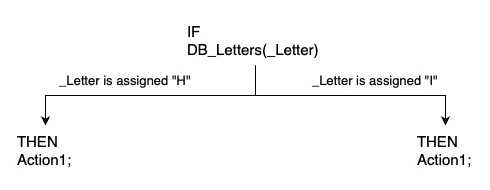
Once _Letter has been assigned a value, we can reuse the variable in the rest of the rule to keep accessing the value assigned to it. However, variables are not shared in between rules. Even if you already assigned a value to _Letter in one rule, it will not carry over into any other rule.
The naming convention for variables in Osiris is to always start with an underscore:
_
To summarize, using an undeclared variable in a database condition means that the rule will be triggered by every fact added to the database, because the rule must be evaluated separately for every possible value that can be assigned to the variable.
This also means that…
IF
DB_Letters("H")
THEN
Action1;
…and…
IF
DB_Letters(_Letter)
AND
_Letter == "H"
THEN
Action1;
…are logically equivalent rules. The difference is that the second rule will be triggered for evaluation every time a fact is added to the database, which is less efficient than only triggering for the fact we care about.
_Letter == "H"is a comparison condition, which will be discussed later in this guide.
We can also use NOT with variables to require that a fact with the variable’s value doesn’t exist in a database. However, the variable does have to already be assigned a value. We can’t use an undeclared variable in an inverted database condition because that would mean the rule has to be evaluated once for every fact that the database doesn’t contain, which isn’t possible.
In the previous sections, each fact has only contained one value / column, such as the letter "H". However, we can also use database conditions with facts that have more than one value.
For example, we might want facts in DB_Letters to contain both a letter and its alphabetical value. "A" has the alphabetical value 1 because it’s the first letter of the alphabet, "B" is 2, …, and "Z" is 26.
We can use these kinds of facts by separating the values with commas inside the database’s parentheses, like this:
IF
DB_Letters("A", 1)
THEN
Action1;
For the condition in this rule to evaluate to true, the database DB_Letters must contain a fact where the first column is "A" and the second column is 1 (which can also be written as ("A", 1) to be more concise). The condition would not trigger or evaluate to true even if we define a fact that contains some but not all of these values.
We can also use undeclared variables for every column in a fact.
IF
DB_Letters(_Letter, _Value)
THEN
Action1;
Again, the rule will be evaluated separately for every fact in the database, and each undeclared variable is assigned the corresponding value in that fact.
We can even use literals and variables together in any combination, such as to require the sixteenth letter of an alphabet without specifying its letter value.
IF
DB_Letters(_Letter, 16)
THEN
Action1;
Because we have an undeclared variable in this condition, the rule will still be evaluated separately with every value that the variable can be assigned from DB_Letters. However, it behaves a little bit differently now that we have an undeclared variable and a literal (or even an assigned variable) in the same condition. Now, the facts that the undeclared variable can be assigned a value from will be filtered to only the ones whose other values match the literals in our rule. That is, _Letter can only be assigned values from facts with an alphabetical value of 16.
If DB_Letters only stores the English alphabet, there will only be one sixteenth letter, and so the rule will only be evaluated once where _Letter is assigned "P". If we had multiple alphabets, then there would be multiple sixteenth letters, and so the rule would be evaluated once for each of them.
Sometimes we might not have a use for one or more of the values in a fact. If so, we can leave it unbound by only putting an underscore (_) instead of naming a variable, like this:
IF
DB_Letters(_, 16)
THEN
Action1;
Keep in mind that unbound variables do not change how many times the rule is evaluated. It’s tempting to think that the previous rule will only trigger the first time a sixteenth letter in any alphabet is added because it’s only ‘listening’ to that one value, but database conditions are triggered by entire facts and not individual values, and so a new value in an unbound variable will still cause the rule to be evaluated even if the bound variables have already been evaluated.
Be aware that using the same database name with a different number of columns will behave like they’re two completely separate databases. Even if you only want the first column in a database, defining a fact with
DB_Letters("A", 1);will not trigger the conditionDB_Letters(_Letter)because they store different kinds of facts and are therefore treated like separate databases.
Unless you’re reusing a database name with a different number of columns, you cannot reorder or change variable types of the columns in a database after it is defined.
We can use more than just two values / columns in facts stored by a database, and it will continue to scale as has been described in this section.
We already know that Osiris will evaluate a rule separately for every fact that can assign a value to an undeclared variable. When we have more than one condition with undeclared variables, this means that Osiris has to evaluate the rule for every possible combination of facts. That is, if the first variable has two possible facts that can be assigned to it, and the second variable has two possible facts that can be assigned to it, then Osiris must evaluate the rule 2x2 = 4 times.
Let’s go through a step-by-step example with this rule:
IF
DB_Letters(_Letter)
AND
DB_Numbers(_Number)
THEN
Action1;
Assume that both databases start empty.
First, let’s add the fact "A" to DB_Letters. This triggers the rule for evaluation. There is only one fact in DB_Letters, so _Letter is assigned "A". There are no facts in DB_Numbers, so the second condition is false and the rule stops being evaluated.
Next, let’s add the fact 1 to DB_Numbers. This triggers the rule for evaluation. There is only one fact in DB_Letters, so _Letter is assigned "A". There is only one fact in DB_Numbers, so _Number is assigned 1. Now that all conditions have been met, Action1 is executed.
Let’s add another fact, 2, to DB_Numbers. This triggers the rule for evaluation. There is still only one fact in DB_Letters, so _Letter is assigned "A" again. There are two facts in DB_Numbers now, so the rule will split into two separate evaluations where _Number equals 1 in one version and 2 in the other. This gives us two combinations of variables which can be written more concisely as ("A", 1) and ("A", 2). The combination ("A", 1) has already been evaluated, so it won’t be evaluated (or executed) again. However, the combination ("A", 2) is new and meets all of the conditions, so Action1 will be executed a second time with these variables.
Finally, let’s add the fact "B" to DB_Letters. This triggers the rule for evaluation. There are two facts in DB_Letters, so the rule splits into two separate evaluations where _Letter equals "A" in one version and "B" in the other. There are also two facts in DB_Numbers, so each of the two evaluations splits into two again, where _Number equals 1 in one version and 2 in the other. Or, put in another way, there are four different combinations of the facts in DB_Letters and DB_Numbers:
("A", 1)("A", 2)("B", 1)("B", 2)
We can also see this visually:
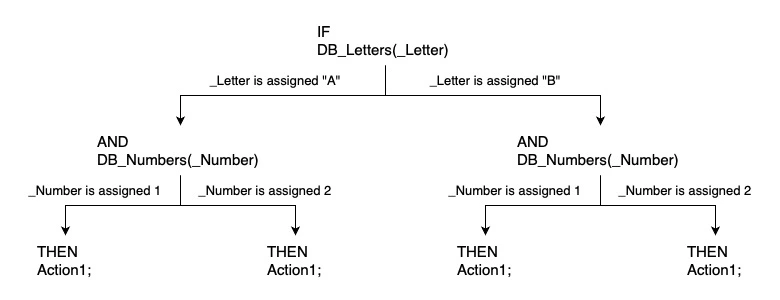
Osiris wants to evaluate all of them. ("A",1) and ("A",2) have already been evaluated and executed, but ("B",1) and ("B",2) are new, and so adding the fact "B" causes Action1 to execute where the variables equal the combinations ("B",1) and ("B",2).
Now let’s really test our understanding of how Osiris evaluates every combination of facts! If you’re still getting comfortable with the basics, feel free to skip this section and come back later.
Consider the following rule:
IF
DB_Letters(_New)
AND
DB_Letters(_Old)
THEN
Action1;
Notice that both undeclared variables come from the same database.
Assume that DB_Letters starts empty.
If we start by adding the fact "A", Osiris evaluates the combination where both _New and _Old equal "A", or ("A","A").
Now let’s add the fact "B". Both _New and _Old can now be "A" or "B", which gives us four possible combinations:
("A", "A")("A", "B")("B", "A")("B", "B")
The rule has already been evaluated for ("A", "A"), so there are only three new combinations to evaluate. However, let’s consider how each of these new evaluations are triggered - it’s going to be important in a moment.
The first database condition has already been triggered for when _New equals "A", so it only triggers for when _New equals "B". This gives us the evaluations for ("B","A") and ("B","B").
The second database condition has also already been triggered for when _Old equals "A" and will only trigger again when _Old equals "B". This gives us the evaluations for ("A", "B") and ("B", "B").
As you can see, ("B", "B") is triggered for evaluation twice. However, it will only be evaluated the first time it is triggered. This means we get the three new evaluations in this order: ("B","A"), ("B","B"), and finally ("A", "B").
Why does this matter? Let’s modify the rule a little bit to see.
IF
DB_Letters(_New)
AND
DB_Letters(_Old)
AND
_New != _Old
THEN
NOT DB_Letters(_Old);
We’ve made two changes:
-
We added a third condition,
_New != _Old. This is an extra condition called a comparison that will evaluate to false and stop the rule from executing if the two variables have the same value. -
We specified the action we want the rule to execute. When a database is used as an action, we’re either adding or removing a fact from the database. In this case, the
NOTmeans that we’re removing the fact_OldfromDB_Letters.
Let’s take a look at what this new version of the rule does when we defined the second fact "B". As discussed for the previous version of the rule, it will trigger evaluations with these three combinations of values for _New and _Old: ("B","A"), ("B","B"), and finally ("A", "B").
The first combination ("B", "A") satisfies all three conditions and is executed, removing the fact stored by _Old ("A") from DB_Letters.
The second combination ("B", "B") does not satisfy all three conditions because _New and _Old have the same value, so the rule does not execute.
The third combination ("A", "B") is no longer valid because we’ve removed "A" from the database, so the rule does not execute.
The end result of this rule is that, every time a fact is added to DB_Letters, it removes every other fact from the database. Basically, it limits a database to contain only the most recently added fact. We can use the database like normal in every other rule, but this rule will always be running in the background to give the database a unique behavior. It’s pretty neat!
This might seem like a pointless rule to have, but actually it’s almost identical to one that’s in the game and keeps track of whether the best boy Scratch is currently a camp follower or a summoned familiar.
¶ Events
Events are another kind of trigger condition. They have to be the first condition of a rule, which also means you can only use at most one event per rule. Whenever something happens in the game that corresponds to this event, it will trigger all of the rules that use it. There are events for when dialogue starts and ends, a change in approval rating, quest progress, being caught committing a crime, casting a spell, and so much more.
Most events have one or more parameters that give us information about the event. As an example, there is an event named AddedTo for when an item is added to a character’s inventory. All that the event being triggered tells us is that some item has been added to someone’s inventory, and so we need the event’s parameters to tell us which item has been added to whose inventory.
We can find the full details for the AddedTo event in the list of Osiris events (reformatted here for clarity):
AddedTo((GUIDSTRING)_Object, (GUIDSTRING)_InventoryHolder, (STRING)_AddType)
Its parameters and their variable types are listed inside the parentheses. AddedTo has these three parameters:
-
_Object: A Globally Unique Identifier (GUID) for the game object that was put into the character’s inventory -
_InventoryHolder: A GUID for the character who received the object -
_AddType: A word or phrase that specifies the way the item was given to the character.
The event AddedTo is guaranteed to provide values for all three of these parameters. However, we can choose to rename or not use any of them at all. For example, the AddedTo event can be used in a rule like this:
IF
AddedTo(_Object, _Character, _)
THEN
Action1;
In this case, the undeclared variable _Object receives the _Object parameter, the undeclared variable _Character receives the _InventoryHolder parameter, and the unbound variable _ indicates that this rule doesn’t want the _AddType parameter to be assigned to anything.
Even when we don’t want to use a parameter, we have to at least put an unbound variable in its spot - Osiris won’t recognize the event if it has a different number of parameters than its definition.
Event parameters can be used in many different ways. For example, we might only want to do something when this event is triggered by an item added to a player’s inventory, and not for NPCs. Because the event assigned the GUID of the character who received the item to _Character, we can now also require this GUID to exist in the game’s database of player characters to limit for whom the rule will execute:
IF
AddedTo(_Object, _Character, _)
AND
DB_Players((CHARACTER)_Character)
THEN
Action1;
Notice that _Character is an undeclared variable when it is used with AddedTo, but after it is assigned a value it behaves like a literal when the condition DB_Players((CHARACTER)_Character) is evaluated. If the character who received an item is Lae’zel, her GUID S_Player_Laezel_58a69333-40bf-8358-1d17-fff240d7fb12 will be assigned to _Character, and so DB_Players((CHARACTER)_Character) will be evaluated the same as DB_Players((CHARACTER)S_Player_Laezel_58a69333-40bf-8358-1d17-fff240d7fb12).
IMPORTANT NOTE:
If you were to actually hard-code Lae’zel’s GUID into the database condition, the rule will behave very differently. Why? Because we’re no longer requiring the character involved in the
AddedToevent to be inDB_Players, we’re only requiring that Lae’zel is inDB_Players. This means the rule will execute for an NPC receiving an item if Lae’zel is in the party at the time, while also not executing for a player receiving an item if Lae’zel is not in the party at the time.Even though assigned variables are evaluated like constant values within the scope of one condition or action, it is very important to remember that swapping variables and literals can cause significant changes to the behavior of a rule as a whole.
Another quirk of using an assigned variable is that we might need to typecast it. Every parameter and value in a fact has a type assigned to it (like an integer, GUID, or string), and we might need to convert the type of variable it is to use it with something else. The _Object parameter in the AddedTo event has the type GUIDSTRING, but facts in DB_Players have the type CHARACTER, so we have to typecast our _Object variable to CHARACTER in order to use it with DB_Players.
Every event can be used in any number of rules, and it will trigger every rule that uses it when the event occurs in the game. If we wanted to execute a different action depending on what kind of object was added to the player’s inventory, we could have two different rules like this:
IF
AddedTo(_Object, _Character, _)
AND
Condition1
THEN
Action1;

IF
AddedTo(_Object, _Character, _)
AND
Condition2
THEN
Action2;
Both of these rules will be triggered by the AddedTo event. Depending on whether Condition1 and/or Condition2 are true, then a different combination of actions will be executed after the event triggers them.
We can also put a constant value in the place of one or more of the event’s parameters to filter the circumstances of the event that triggers the rule. For example, we could make the rule only trigger when Lae’zel receives an item like this:
IF
AddedTo(_Object, S_Player_Laezel_58a69333-40bf-8358-1d17-fff240d7fb12, _)
THEN
Action1;
This means we don’t have the variable _Character anymore, but we don’t need it because we know the rule will only trigger when _Character would have been assigned Lae’zel’s GUID, so we can just continue hard-coding this value throughout the entire rule when we need it.
Keep in mind that rules with an event won’t execute after being triggered by something other than the event, like a database condition. They will only ever be able to execute from being triggered by the event. Even though database conditions should trigger the rule for evaluation like normal, every condition must be true for a rule to execute, and event conditions only ever seem to be true when they are the trigger.
¶ Queries
Queries are a type of extra condition that are used to get more information about the game’s current state. There are queries to get a game object’s location, one character’s approval rating of another character, the template a game object was created from, whether an item can be sat on, and much more. There are also queries that perform certain actions like combining strings, doing basic arithmetic, generating a random number, and so on!
Every query has one or more in-parameters that specify how you want the query to be executed (you put information in to it). Every in-parameter must be provided an assigned variable or a constant value. For example, to query a character’s current hitpoints with GetHitpoints, you have to tell it which character you want to get the hitpoints of.
Every query also has one or more out-parameters that return the results of the query (you get information out of it). There are three ways to use out-parameters:
-
Give it an undeclared variable that will be assigned the query result
-
Give it a constant value or an assigned variable that the result must match (more on this in a moment)
-
Leave it as an unbound variable
It’s important to distinguish between the query’s success and its results. Remember that a query is a condition in a rule that must evaluate to true in order for the rule to execute, it just also returns information to answer some kind of question. So if we use a query that checks whether an object can be sat on, the query itself will evaluate to true if any answer is found, even if the answer is false (the object cannot be sat on).
There are only two ways that the actual query condition will evaluate to false:
-
The query cannot be completed, typically because the answer to the question does not exist. For example, you can’t get the position of an object that does not exist, nor can you get the currently equipped shield of a character who does not have any shield equipped, etc.
-
One or more of the query’s out-parameters are filled in with a constant value or an assigned variable that the query results do not match.
It’s technically possible for a query to be the first condition in a rule, but it’s probably not advisable to do this because it is an extra condition. This means that queries will never trigger the rule, which means they can’t be the rule’s only condition because a rule must be able to be triggered, and it usually just makes more sense for trigger conditions to come first.
Let’s look at an example for all this. To start, we need to find the full details for the query GetHitpoints in the list of Osiris calls and queries (reformatted here for clarity):
GetHitpoints([in](GUIDSTRING)_Entity, [out](INTEGER)_HP)
Notice how both parameters start with [in] or [out] to specify whether it’s an in-parameter or an out-parameter. (Or, in the linked resource, in-parameters are listed before the query with @param and out-parameters are listed with @return.)
The in-parameters will always come first, and the out-parameters are at the end. In this case, we have one of each. We have to provide the GUID of the game object we want to get the hitpoints of, and we get an integer with the number of hitpoints back.
For our example, let’s make a rule that executes for every player with 0 HP at the end of combat.
IF
CombatEnded(_)
AND
DB_Players(_Player)
AND
GetHitpoints(_Player, _HP)
AND
_HP == 0
THEN
Action1;
The first condition is the event CombatEnded with one parameter that is left unbound. The second condition is the database of players that will split the rule into separate evaluations for each fact that can be assigned to _Player. The third condition is the query GetHitpoints that receives the assigned variable _Player and then assigns the result (their number of hitpoints) to the undeclared variable _HP. The fourth and final condition is a comparison that requires _HP to equal 0.
In this rule, the query condition GetHitpoints(_Player, _HP) should always evaluate to true. However, we can make the rule more efficient by replacing _HP with the result we require so that the query condition will only evaluate to true if _Player has zero hitpoints. This lets us get rid of the comparison condition, like this:
IF
CombatEnded(_)
AND
DB_Players(_Player)
AND
GetHitpoints(_Player, 0)
THEN
Action1;
This shorthand is especially useful with queries that return a true or false result. These results are usually returned as integers where 0 means false and 1 means true.
Let’s look at another quick example where we check if an object that was just put into a player’s inventory is created from a template we care about. The following rule does this with the query GetTemplate and an imaginary database DB_HealingPotionTemplates that would need to be filled with template GUIDs:
IF
AddedTo(_Object, _Character, _)
AND
GetTemplate(_Object, _Template)
AND
DB_HealingPotionTemplates(_Template)
THEN
Action1;
In this example, we do need the out-parameter from GetTemplate to be assigned to the undeclared variable _Template so that we can require it to exist in the pre-populated database of template GUIDs. If it does, then the game object added to the character’s inventory must be a type of healing potion, and so the rule will execute.
We can also write rules that will execute only if a query evaluates to false by inverting the query condition with NOT. To require that an answer to the query does not exist, we also need to leave all of the out-parameters unbound.
For example, if we want a rule to execute when a character joins combat without any shield equipped (which will cause the query GetEquippedShield([in](CHARACTER)_Character, [out](ITEM)_Item) to fail and evaluate to false), we can do this:
IF
EnteredCombat(_Character, _)
AND
NOT GetEquippedShield((CHARACTER)_Character, _)
THEN
Action1;
¶ Other Types of Queries
There are several more specific types of and uses for queries that are worth discussing in the following sub-sections.
Some queries are used to perform an operation instead of getting information about the game’s state. As mentioned at the start of the section on queries, there are some that combine strings, perform basic arithmetic, generate a random number, and more. The reason they are still technically queries is because they are used in the condition section of a rule and return some kind of information, unlike Calls and Procedures, which are used in the action section of a rule and do not return any information.
Let’s use the query to find the sum of two integers as an example:
IntegerSum([in](INTEGER)_A, [in](INTEGER)_B, [out](INTEGER)_Sum)
It takes two different integers as in-parameters and then returns the sum as the out-parameter. Even though it performs an action, we can use it in a rule’s conditions just like any other query. For example, we might have a database with a counter for the number of times an event has occurred called DB_EventCounter, and we could increment it with the following rule:
IF
Condition1
AND
DB_EventCounter(_Count)
AND
IntegerSum(_Count, 1, _NewCount)
THEN
NOT DB_EventCounter(_Count);
DB_EventCounter(_NewCount);
Note: This rule will only execute if there’s already a fact in DB_EventCounter that can be assigned to _Count. So, to be able to start counting, we would need to define the fact 0 in the script’s INIT section. From then on, every time we add a new fact to the database, we also remove the previous fact, so DB_EventCounter is guaranteed to only store one fact that is the current count of how many times Condition1 has occurred.
We can also define and use our own queries. The main difference with custom queries is that they do not return a result (e.g. they do not have out-parameters), and so they are often only used to answer true or false questions by checking whether the query condition evaluates to true.
Remember that normal query conditions can evaluate to true even if they return a result of false. Custom queries don’t have results, so the condition’s success or failure is the information we get from it directly.
The structure of a custom query rule is very similar to normal rules:
QRY
QRY_QueryName((Type1)Parameter1, (Type2)Parameter2)
AND
Condition1
AND
Condition2
THEN
Action1;
Action2;
Custom queries can have as many or few parameters as you want (including none at all).
If all of the rule’s conditions are true, then the query evaluates to true. If its conditions use undeclared variables, the rule will be evaluated once for each combination of values that can be assigned to them (just like normal rules), and only one version of the rule needs to succeed for the query to evaluate to true. This also means that every version of the query’s rules have to fail in order for the query to evaluate to false.
Notice that custom queries have an action section where we can execute all of the same actions that a normal rule can. However, I think it’s usually better design to not execute actions directly inside of a custom query because it can easily lead to unpredictable behavior unless you’re very comfortable with declarative logic. With one very useful exception that will be discussed at the end of this section, I recommend only using the database action DB_NOOP(1); in the action section for custom queries. “NOOP” is short for “NO OPeration” because the fact 1 is already defined in this database, and so re-defining it won’t do anything at all - it’s just a placeholder we can put in the action section to make the rule syntactically complete.
Custom queries are shared across the entire Osiris story. This means you can use custom queries defined in other scripts/goals, but also that you will need to choose unique names for any that you write so they don’t get unintentionally combined with one another.
Let’s look at a quick example of when a custom query is useful and how to write it. If we want a rule that will execute when no one in the party has any gold after a Long Rest, it might be tempting at first to write a normal rule like this:
IF
LongRestFinished()
AND
DB_Players(_Player)
AND
GetGold((GUIDSTRING)_Player, 0)
THEN
Action1;
However, this rule will not do what we want. It will individually evaluate each character in the party because of the undeclared variable _Player, and then execute once for each character that doesn’t have any gold instead of only executing a single time if no one has any gold.
To fix this, we can move the undeclared variable out of this rule and into a custom query. When we call the custom query, its rule will also evaluate the characters individually, but the query condition in our original rule will evaluate to true or false based on whether anyone or no one satisfies its conditions, which is the more general answer we need. We can write the query’s rule like this:
QRY
QRY_CharacterInPartyHasGold()
AND
DB_Players(_Player)
AND
GetGold((GUIDSTRING)_Player, _Gold)
AND
_Gold > 0
THEN
DB_NOOP(1);
Notice that this query will evaluate to true if anyone has gold even though we want to know the opposite. This is because checking if the characters don’t have gold would make the query evaluate to true even if just one character doesn’t have any and the rest do. Instead, because it’s challenging to directly check for what we want, we’ve just written a query that checks for the failure state and then can invert its query condition:
IF
LongRestFinished()
AND
NOT QRY_CharacterInPartyHasGold()
THEN
Action1;
This new version of the rule will only be evaluated once, and if QRY_CharacterInPartyHasGold() finds that anyone has gold then its inverted query condition will prevent the rule from executing. However, if it fails to find anyone with gold, then the rule will execute once. There’s probably lots of ways to do something like this, but custom queries are an incredibly powerful and (once you get used to them) easy way to do so.
Another excellent use case for custom queries is implementing logical ORs. You can write more than one rule for a custom query, and if they share the same name and parameters then they will all be evaluated when the query is used in a condition. (And, same as before, only one version of any of the query’s rules needs to be true for the overall query to evaluate to true.)
For example, if you want to do something to characters who join combat if they have less than 10 hit points or if they have the burning condition, you could do this without custom queries by writing a normal rule for each situation:
IF
EnteredCombat(_Character, _)
AND
GetHitpoints(_Character, _HP)
AND
_HP < 10
THEN
Action1;

IF
EnteredCombat(_Character, _)
AND
HasActiveStatus(_Character, "BURNING", 1)
THEN
Action1;
Or, you can write a custom query with two rules (one for each situation), and then use the custom query in a single rule that handles both possibilities:
QRY
QRY_MyCustomConditions((GUIDSTRING)_Character)
AND
GetHitpoints(_Character, _HP)
AND
_HP < 10
THEN
DB_NOOP(1);

QRY
QRY_MyCustomConditions((GUIDSTRING)_Character)
AND
HasActiveStatus(_Character, "BURNING", 1)
THEN
DB_NOOP(1);

IF
EnteredCombat(_Character, _)
AND
QRY_MyCustomConditions(_Character)
THEN
Action1;
The custom query might not seem worth it in this simple example, but if you have a logical OR that can be satisfied in 3+ ways, or if you need to use the same logical OR multiple times, etc., then using custom queries like this can become extremely valuable.
Finally, let’s look at the one exception where I do recommend executing actual actions in a custom query: implementing our own query return values. Even though custom queries do not have any out-parameters that return a result, we can mimic this behavior by defining a fact in a query-return database that we check immediately after calling the query.
A good naming convention for query-return databases is:
DB_QRYRTN_QueryName
When creating custom queries that return a result in a database, it’s important to always make the first rule for the query do nothing but empty the query-return database of any fact(s) left over from the last time the query was used.
For a very simple example, let’s recreate the GetHitpoints query as a custom query that returns a numerical value (the character’s hitpoints) instead of just true or false:
// The query's first rule needs to clear the result from the last time it was used
QRY
QRY_CustomGetHitpoints((GUIDSTRING)_Character)
AND
DB_QRYRTN_CustomGetHitpoints(_HP)
THEN
NOT DB_QRYRTN_CustomGetHitpoints(_HP);

// The query's second rule does the actual work to find an answer...
QRY
QRY_CustomGetHitpoints((GUIDSTRING)_Character)
AND
GetHitpoints(_Character, _HP)
THEN
DB_QRYRTN_CustomGetHitpoints(_HP); // ...and then store the result in the QRYRTN database

// To use the query...
IF
EnteredCombat(_Character, _)
AND
QRY_CustomGetHitpoints(_Character) // ...we call it through a condition...
AND
DB_QRYRTN_CustomGetHitpoints(_HP) // ...and then have the QRYRTN database assign its result to an undeclared variable.
THEN
Action1; // Now we can do something with the result
Custom query returns are ordinarily used for much more than just adding a wrapper to a default query, but this should illustrate the overall structure for how to implement and use them in a script.
Another powerful use of queries is to stop a rule from executing more than once for the entirety of the game. For example, we might want to do something only for the very first player character, but using a database condition with DB_Players will cause the rule to evaluate for every character. This would be fine in a new singleplayer game that starts with only one character (and we could prevent the rule from executing again later by defining a fact in a database that this rule requires to be undefined), but if the mod is added to a multiplayer game or one that already exists and has multiple characters in the party, then the rule will incorrectly execute multiple times.
Luckily, there is a query QRY_OnlyOnce that takes a string as an in-parameter and only evaluates to true the first time it is called with that particular string. Even if multiple versions of the rule are being evaluated at the same time, QRY_OnlyOnce will only evaluate to true for one of them.
IF
DB_Players(_Player)
AND
QRY_OnlyOnce("OsirisGuide_OnlyOnceExample")
THEN
Action1;
The string "OsirisGuide_OnlyOnceExample" needs to be unique for each rule that should only execute once. To help make it unique from every other mod, I’d recommend adding abbreviations of your username and the mod name to the beginning or end.
The order of conditions is very important for QRY_OnlyOnce because the query will only evaluate to true once, regardless of whether or not the rule ends up executing. This means if we make the query before all other conditions are satisfied, the rule might never execute. Consider the following example:
IF
DB_Players(_Player)
AND
QRY_OnlyOnce("OsirisGuide_OnlyOnceExample")
AND
GetHitpoints(_Player, _HP)
AND
_HP > 100
THEN
Action1;
This rule is only supposed to execute once for a player character who has more than 100 hitpoints. However, we call QRY_OnlyOnce before requiring the character assigned to _Player to have more than 100 hitpoints, and so the rest of the rule will only ever be evaluated once. If the first player to be checked has less than 100 hitpoints, the rule will not execute. From then on, whenever the rule is triggered it will never make it past QRY_OnlyOnce.
Instead, the query should almost always be the last condition in a rule. This means that a rule must satisfy all other conditions and is going to execute unless it has already executed.
If you do want to reset the query so that a rule can execute one more time, you can use the query QRY_OnlyOnce_Reset in another rule and give it the same string you want to ‘unlock’ for its in-parameter. The next time QRY_OnlyOnce is queried again, it will evaluate to true one more time. For example, the following rule would make it so that something can execute once per long rest:
IF
LongRestFinished()
AND
QRY_OnlyOnce_Reset("OsirisGuide_OnlyOnceExample")
THEN
DB_NOOP(1);
¶ Comparisons
Comparisons are an extra condition that require two values to have a certain relationship to each other. That is, the two values might need to equal each other, one might need to be smaller than the other, etc. Each of these values can be either a literal or an assigned variable. We cannot use undeclared variables in a comparison.
The value on the left side of the comparison is usually an assigned variable, and the value on the right side of the comparison is usually either a literal or another assigned variable. For example, the comparison condition _Number == 3 means that the value assigned to the variable _Number must equal 3.
We could also compare two constants, like 3 < 4 to require that 3 is less than 4, but this is always guaranteed to be true so there isn’t much reason to do it unless you want to temporarily disable a rule by comparing constants that will always evaluate to false.
These are the comparison operators that can be used:
==for equality (note that there are two equal signs back-to-back here)!=for inequality<for less than<=for less than or equal to>for greater than>=for greater than or equal to
Comparisons are useful in many different circumstances. For one simple example, assume we have stored a count of how many times an event has occurred in the database DB_EventCounter, as shown in the Action Queries section of this guide. If we only want to do something the first four times an event occurs, we could do so with the following rule:
IF
DB_EventCounter(_Count)
AND
_Count > 0
AND
_Count <= 4
THEN
Action1;
This rule uses two different comparisons so that the rule only executes if the count in DB_EventCounter is larger than 0 and less than or equal to 4. This means that the rule won’t execute when the initial fact 0 is added to the database in the INIT section, and then it will execute when the counter increments to 1, 2, 3, and 4. After this point, it will stop executing.

